
PDF Traduzione Selezionata - Trasforma Ogni Selezione in un Gateway di Traduzione Intelligente

Doclingo PDF Traduzione Selezionata - Trasforma Ogni Selezione in un Gateway di Traduzione Intelligente
14 luglio 2025
Con la globalizzazione della conoscenza e la quotidianità della collaborazione tra lingue, sempre più utenti necessitano di una lettura approfondita e comprensione semantica dei documenti PDF. Tuttavia, la traduzione integrale tradizionale spesso non soddisfa le esigenze contestualizzate di ricerca di termini, spiegazione di terminologie e approfondimenti di contesto. La funzione di traduzione selezionata di Doclingo PDF, con capacità AI interattive al centro, ti consente di selezionare contenuti in qualsiasi posizione del PDF e di godere immediatamente di esperienze multidimensionali come ricerca intelligente, traduzione istantanea, spiegazione di contesto e chat AI, aumentando notevolmente l'efficienza nella lettura e nell'estrazione di informazioni dai PDF!
Perché scegliere la traduzione selezionata di Doclingo PDF?
1. Ricerca AI e traduzione multilingue tutto in uno
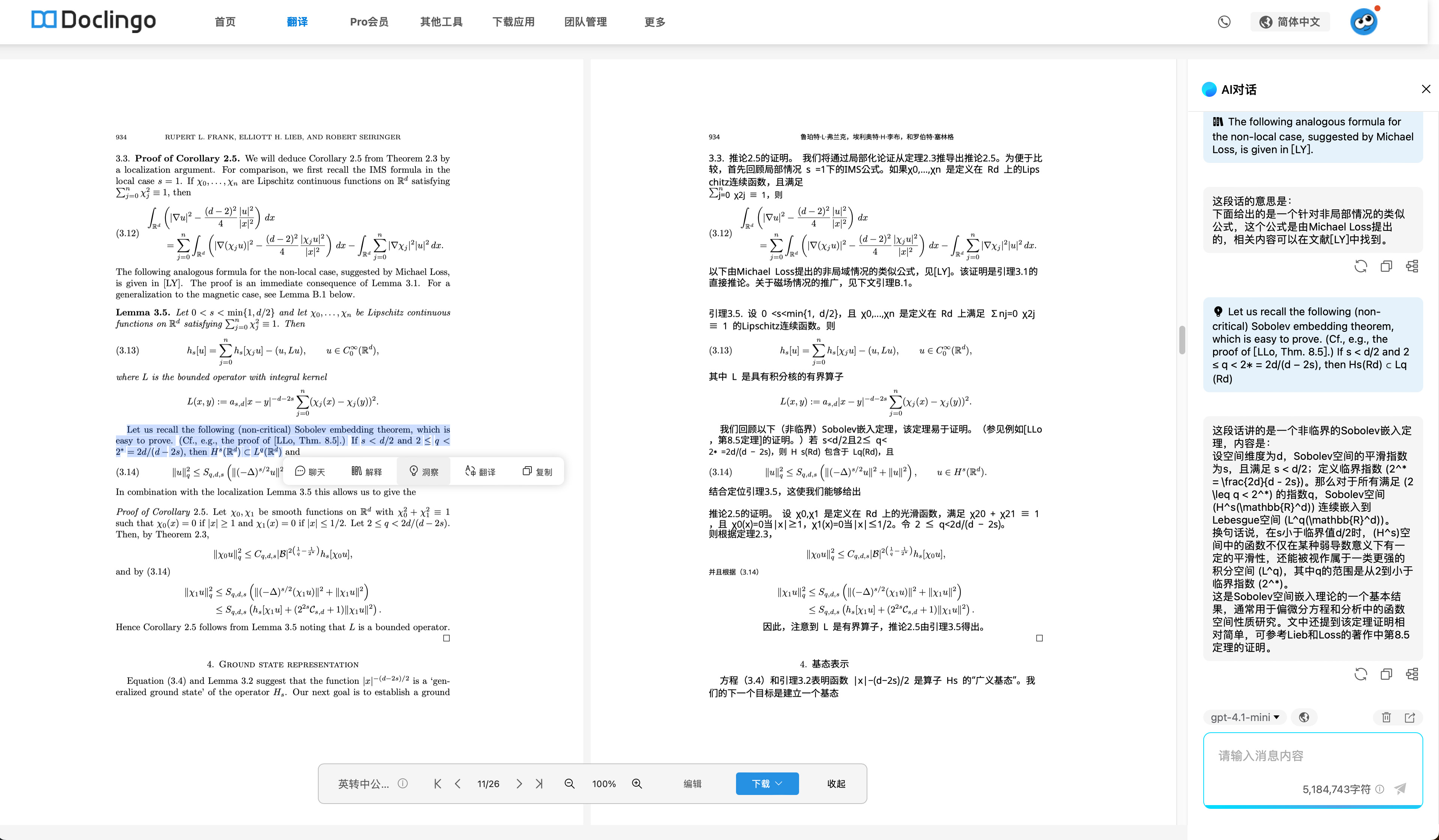
Basta selezionare qualsiasi frase, parola o paragrafo del testo originale nella visualizzazione di confronto dopo la traduzione del PDF, e Doclingo aprirà un menu di operazioni intelligenti.
Le funzionalità supportate sono le seguenti:
- 【Traduzione】: ottieni una traduzione precisa con un clic, supportando oltre 90 lingue
- 【Spiegazione】: analisi approfondita di termini tecnici, frasi complesse e conoscenze di contesto da parte dell'AI
- 【Approfondimento】: ottieni informazioni contestuali per supportare la comprensione di documenti accademici e di settore
- 【Chat】: assistente AI che supporta ulteriori domande, spiegazioni estese e chiarimenti grammaticali
- 【Copia】: copia rapidamente la parte selezionata
2. Integrazione senza soluzione di continuità, esperienza interattiva estrema
- Attualmente supporta solo operazioni interattive su PC, mentre l'esperienza su piattaforme mobili H5 e mini-programmi è in fase di sviluppo
- Operazioni fluide, ciò che vedi è ciò che ottieni, senza necessità di navigare, copiare o incollare
- Può essere abbinato alla traduzione integrale, completando interazioni rapide in una finestra di dialogo laterale
Scenari di utilizzo tipici
- Ricerca accademica: lettura approfondita di documenti, ricerca immediata di vocaboli rari, termini tecnici e frasi complesse per supportare la scrittura e la lettura di tesi
- Business internazionale: ricerca di significato di clausole chiave in contratti, fatture, preventivi, per garantire comunicazioni commerciali accurate
- Apprendimento delle lingue: lettura approfondita di libri di testo in lingua straniera e romanzi originali, supportando spiegazioni dettagliate di frasi e analisi grammaticali
- Gestione di documenti quotidiani: documenti come notizie multilingue, rapporti e analisi di mercato, per ottenere conoscenze di contesto quando si incontrano difficoltà
Dimostrazione operativa
- Carica o apri un documento PDF
- Seleziona qualsiasi parola, frase o paragrafo del testo originale
- Apparirà immediatamente un menu di operazioni, scegli 【Traduzione】/【Spiegazione】/【Approfondimento】/【Chat】/【Copia】
- Clicca per completare l'operazione
Feedback reale degli utenti
“Usando Doclingo per leggere articoli in lingua straniera, quando incontro frasi che non capisco, seleziono e traduco con un clic, l'efficienza è raddoppiata rispetto a prima!” —— Dottorando di un'università
Una traduzione selezionata di PDF efficiente, intelligente e professionale rende la lettura approfondita e la comunicazione tra lingue molto più semplice!
Il team di Doclingo
Luglio 2025