
Write a PDF from scratch (01): Hello, World - Building a Minimal Usable PDF

Write a PDF from scratch (01): Hello, World - Building a Minimal Usable PDF
Series Goal: Understand PDF as a readable file format - starting with a minimal example that "works," and gradually expanding to graphics, multi-page documents, compression, and resource reuse.
Series Directory
- Part 01 (This Article): Manually create a minimal PDF (1 page + 1 line of text) and use tools to complete it into a standard PDF that can be opened.
- Part 02: Draw lines/rectangles in the content stream (understanding paths, strokes, fills).
- Part 03: Multi-page PDF (how the Pages tree is constructed).
- Part 04: Closer to the real world (compressed streams, resource reuse, optional structures, etc.).
Why Understand the Underlying Structure of PDF?
PDF (Portable Document Format) is one of the most popular page description languages today. Unlike HTML/CSS, which emphasizes "separation of content and presentation, and reflowable" design, PDF emphasizes fixed layout and WYSIWYG - the formatting remains consistent regardless of the device used to open it.
Understanding the underlying structure of PDF has several practical benefits:
- Debugging PDF Generation Issues: When you encounter errors while generating PDFs with a code library, understanding the underlying structure allows you to quickly locate the problem.
- Automated Processing: Operations like batch text extraction, document merging, and watermarking require an understanding of the structure for precise execution.
- Security Auditing: Knowing what content can be embedded in a PDF (JavaScript, attachments, forms, etc.) aids in security analysis.
- Learning File Format Design: The "object graph + random access" design of PDF is a classic example worth studying.
Preparation
This article will first create a "structurally incomplete but logically correct" hello-broken.pdf, and then use pdftk to automatically complete the key structures and output hello.pdf.
- Required Tool: pdftk (free command-line tool, supports Windows/macOS/Linux)
- Output Files:
hello-broken.pdf(handwritten),hello.pdf(openable after repair)
Core Concept: The Three Layers of PDF Structure
The most important aspect of understanding PDF is to establish a three-layer mental model:
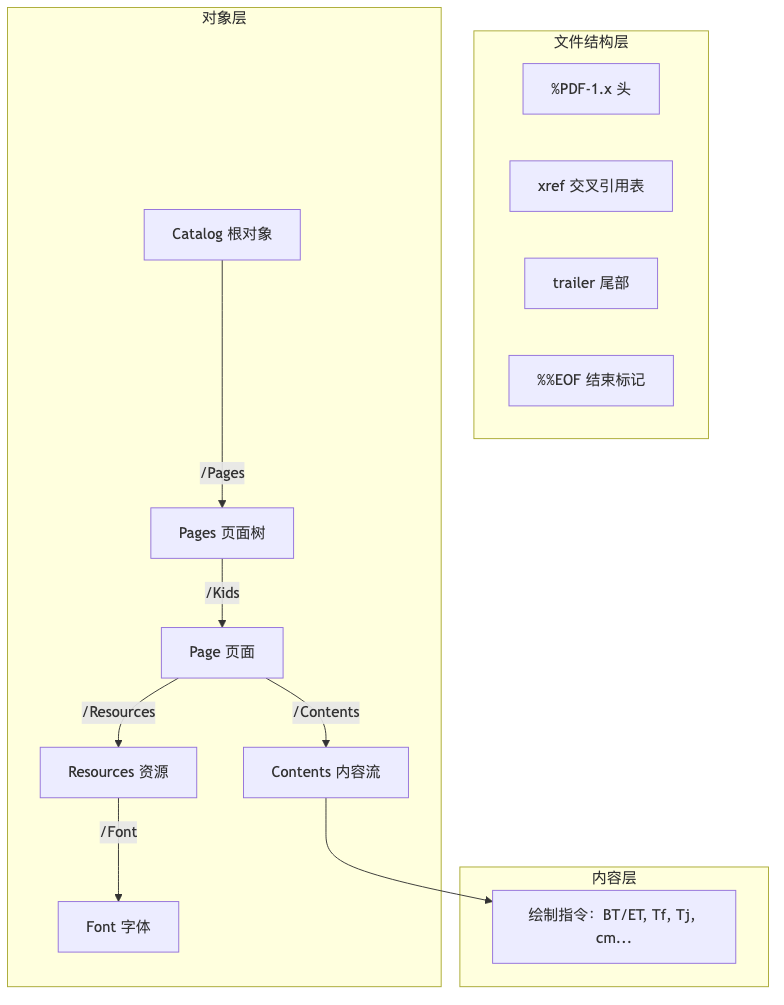
1. Object Layer (Document Content)
A PDF document consists of many objects, which are interconnected through indirect references (e.g., 2 0 R). Common object types include:
| Type | Example | Description |
|---|---|---|
| Name | /Page | Names starting with / |
| Integer/Real | 50, 36.0 | Numeric values |
| String | (Hello, World!) | Enclosed in parentheses |
| Array | [0 0 612 792] | Ordered collection |
| Dictionary | << /Type /Page >> | Key-value pair collection |
| Indirect Reference | 2 0 R | Reference to object 2 (generation number 0) |
| Stream | stream...endstream | Binary data (e.g., drawing instructions, images) |
2. Content Layer (Page Content)
The sequence of instructions that actually "draws text/graphics on the page," typically written between stream ... endstream. The format is: operands first, operators last.
/F0 36 Tf          ← Operand: /F0, 36  Operator: Tf (set font)
(Hello, World!) Tj ← Operand: string   Operator: Tj (draw text)
3. File Structure Layer
Allows the reader to quickly access any object randomly without having to read from start to finish:
| Element | Function |
|---|---|
%PDF-1.x | File header, identifies PDF version |
xref | Cross-reference table: object number → byte offset |
trailer | Trailer dictionary: points to root object /Root |
startxref | Indicates the starting position of the xref table |
%%EOF | End of file marker |
What Objects Are Needed for a Minimal PDF?
A "minimal but displayable" PDF has the following object reference relationships:
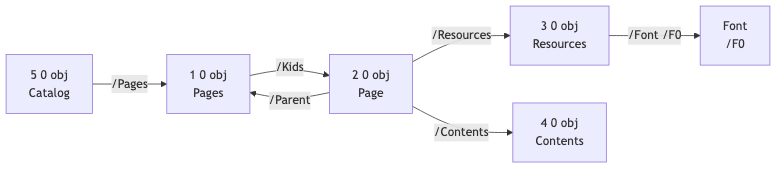
Minimal Object List:
| Object | Function | Key Fields |
|---|---|---|
| Catalog | Root object, document entry | /Type /Catalog, /Pages |
| Pages | Page tree | /Type /Pages, /Kids, /Count |
| Page | Single page | /Type /Page, /MediaBox, /Resources, /Contents, /Parent |
| Resources | Resource container | /Font (font dictionary) |
| Font | Font definition | /Type /Font, /BaseFont, /Subtype |
| Contents | Content stream | Stream of drawing instructions |
Practical Exercise: Manually Create hello-broken.pdf
Create a new file hello-broken.pdf and paste the following content completely:
%PDF-1.0
1 0 obj
<< /Type /Pages
   /Count 1
   /Kids [2 0 R]
>>
endobj

2 0 obj
<< /Type /Page
   /MediaBox [0 0 612 792]
   /Resources 3 0 R
   /Parent 1 0 R
   /Contents [4 0 R]
>>
endobj

3 0 obj
<< /Font
     << /F0
          << /Type /Font
             /BaseFont /Times-Italic
             /Subtype /Type1 >>
     >>
>>
endobj

4 0 obj
<< >>
stream
1. 0. 0. 1. 50. 700. cm
BT
 /F0 36. Tf
 (Hello, World!) Tj
ET
endstream
endobj

5 0 obj
<< /Type /Catalog
   /Pages 1 0 R
>>
endobj

xref
0 6
trailer
<< /Size 6
   /Root 5 0 R
>>
startxref
0
%%EOF
Why is this file "broken"?
We intentionally omitted or incorrectly filled in the following content:
| Missing/Error Item | Description |
|---|---|
xref offset | The actual byte offsets for each object were not filled in. |
startxref | Filled in 0, which is not the actual location of the xref. |
/Length | The content stream does not declare its length. |
| Binary marker | Missing the binary identification line at the header. |
These are key pieces of information needed by the reader; their absence can lead to the file being unopenable or only partially openable.
Key Content Stream Instructions Explained
The content stream is between stream ... endstream in object 4 0 obj, explained line by line:
1. 0. 0. 1. 50. 700. cm   ← Set transformation matrix (note that 1. represents the floating-point number 1.0)
BT                         ← Begin text object
 /F0 36. Tf                ← Select font F0, size 36pt
 (Hello, World!) Tj        ← Draw string
ET                         ← End text object
Transformation Matrix cm Operator
1 0 0 1 50 700 cm is a 6-element transformation matrix [a b c d e f], corresponding to:
| a  b  0 |     | 1  0  0 |
| c  d  0 |  =  | 0  1  0 |
| e  f  1 |     | 50 700 1 |
When a=1, b=0, c=0, d=1, this is a pure translation matrix, moving the origin of the coordinate system (the point where subsequent drawing operations start) to (50, 700). If not moved, the default origin is at the bottom left corner of the page.
Text Operators
| Operator | Meaning | Example |
|---|---|---|
BT | Begin Text, start text object | BT |
ET | End Text, end text object | ET |
Tf | Set font and size | /F0 36 Tf |
Tj | Draw string | (Hello!) Tj |
Use pdftk to Repair into an Openable PDF
Execute the following command in the directory where hello-broken.pdf is located:
pdftk hello-broken.pdf output hello.pdf
Open hello.pdf with any PDF reader, and you should see "Hello, World!" displayed on the page (in Times-Italic font, 36pt, located at the top left of the page).
What Did pdftk Complete for You?
| Completed Item | Description |
|---|---|
| Binary marker line | Added a line of non-printable characters after %PDF-1.0 to ensure it is recognized as a binary file. |
/Length | Calculated and added the byte length for the content stream. |
xref table | Calculated the byte offsets for each object and filled them in. |
startxref | Filled in the actual starting position of the xref table. |
Why Do We Need xref / trailer / startxref?
Core Purpose: Random Access
Imagine a 500-page PDF; without xref, the reader would have to parse from the beginning to display page 450 - which is too slow.
With xref, the reader can:
- Read
startxref→ find the xref location. - Read
trailer→ find the root object/Root. - Follow the root object to directly jump to the page 450 object.
- Use xref to check the byte offset of that object → directly seek to read it.
Time complexity drops from O(n) to O(1).
Exercises for This Article
It is recommended that you actually modify hello-broken.pdf, then repair it again with pdftk and observe the effects:
| Exercise | Modification | Observation |
|---|---|---|
| A | Change (Hello, World!) to another English phrase | Text change |
| B | Change 36 to 12 or 72 | Font size change |
| C | Change 50 700 to 50 100 | Position moves down (PDF coordinate system origin is at the bottom left) |
| D | Change /Times-Italic to /Helvetica or /Courier | Font change |
| E | Change /MediaBox [0 0 612 792] to [0 0 595 842] | Paper size changes from US Letter to A4 |
Tip: The PDF coordinate system origin is at the bottom left of the page, with the Y-axis pointing up.
(50, 700)means 50pt from the left and 700pt from the bottom.
Frequently Asked Questions
Q: Why use built-in Type1 fonts instead of TrueType?
A: The 14 standard Type1 fonts (Times, Helvetica, Courier, etc.) are required to be built into PDF readers, eliminating the need to embed font files, making it simpler. In real scenarios, fonts usually need to be embedded to ensure cross-platform consistency.
Q: What are the numbers in /MediaBox [0 0 612 792]?
A: The unit is point (1 point = 1/72 inch). 612 × 792 points = 8.5 × 11 inches = US Letter paper. A4 is 595 × 842 points.
Q: What is the generation number (like 0 in 2 0 R)?
A: It is used for incremental updates. When an object is modified, the generation number increases by 1. In a newly created PDF, all object generation numbers are usually 0.
Next Article Preview
In Part 02, we will continue using the "handwritten content stream" approach, adding the most basic graphic path operations:
m(moveto),l(lineto): define pathsS(stroke): stroke the pathre(rectangle),f(fill): draw rectangles and fill them
This will allow you to draw: title text + a horizontal separator line + a rectangle on the same page, progressing from "writing text" to "drawing graphics."