
AI-Korrektur und Übersetzungsstil-Funktionen gestartet

Neue Funktion: AI-Korrektur und Übersetzungsstil vollständig gestartet
August 18, 2025
Einleitung:
Bei der täglichen Dokumentenübersetzung stehen die Benutzer oft vor zwei Herausforderungen: unzureichende Genauigkeit der Übersetzung und uneinheitlicher Sprachstil in verschiedenen Szenarien.
Doclingo hat in der Version V1.0.38 offiziell die beiden Funktionen AI-Korrektur und Übersetzungsstil eingeführt, um die Dokumentenübersetzung intelligenter und professioneller zu gestalten (diese Funktion ist nur in der 【Expertenübersetzung】 verfügbar).
1. AI-Korrektur: Professionellere Übersetzungsergebnisse
Traditionelle Übersetzungen erfordern oft wiederholte manuelle Korrekturen, was zeitaufwendig ist und leicht zu Fehlern führen kann.
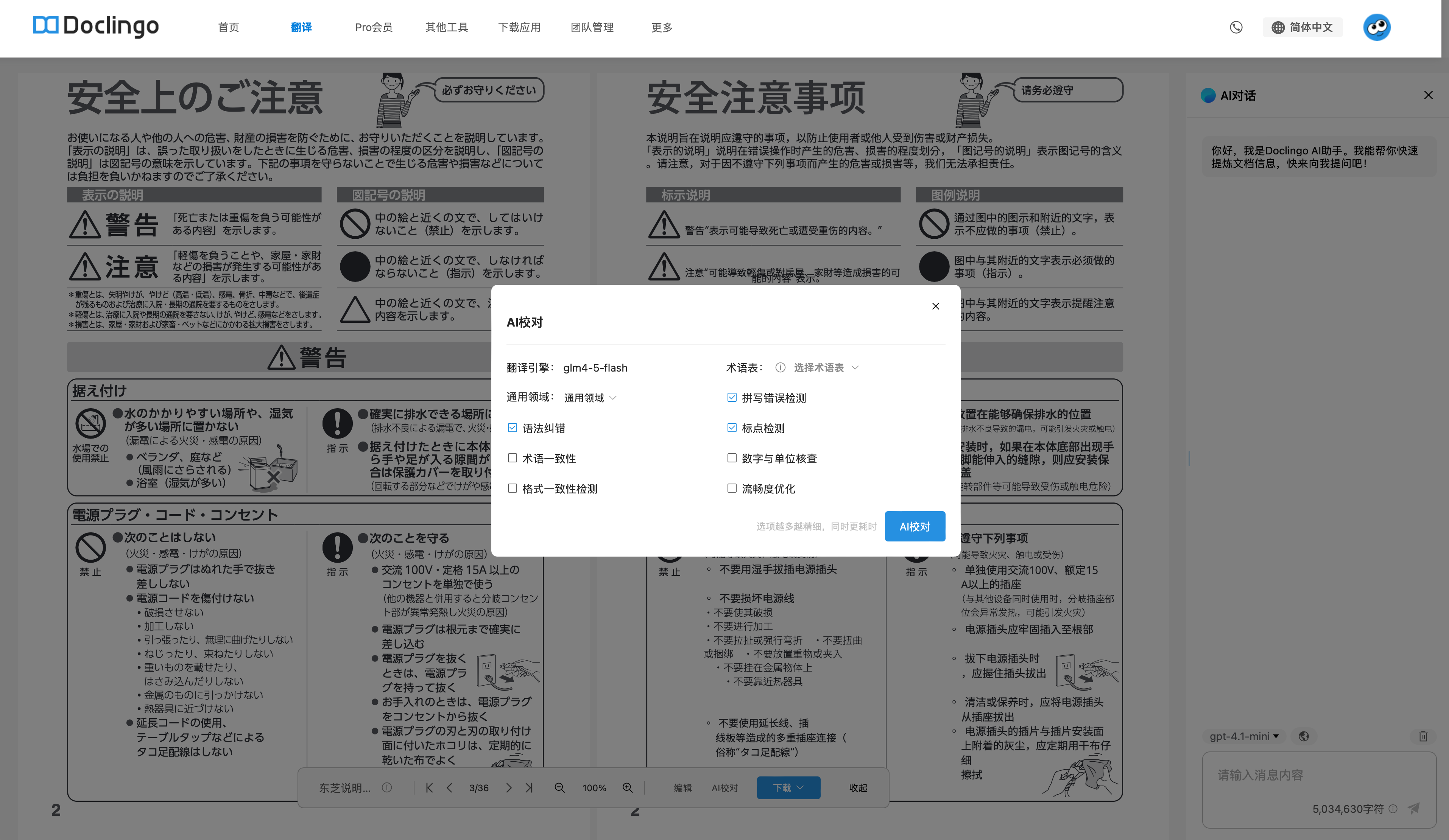
Deshalb kann die neu hinzugefügte AI-Korrektur-Funktion von Doclingo Ihnen helfen, diesen Schritt automatisch zu erledigen:
- Grammatikfehlerkorrektur Überprüfen und Korrigieren von Grammatikfehlern in Sätzen, um die Ausdrucksweise der Übersetzung zu standardisieren.
- Konsistenz der Fachterminologie Sicherstellen, dass Fachbegriffe oder Eigennamen im gesamten Text einheitlich übersetzt werden.
- Formatkonsistenzprüfung Gewährleisten, dass Absätze, Nummerierungen, Listen usw. im Format mit dem Originaltext übereinstimmen.
- Rechtschreibfehlerprüfung Automatisches Erkennen und Korrigieren häufiger Rechtschreibfehler.
- Zeichensetzungsprüfung Überprüfen und Korrigieren von Problemen bei der Verwendung von Satzzeichen, um eine Mischung aus Chinesisch und Englisch oder Auslassungen zu vermeiden.
- Überprüfung von Zahlen und Einheiten Vergleichen von Beträgen, Zeiten, Prozentsätzen und anderen wichtigen Informationen, um Fehler bei den Werten zu vermeiden.
- Optimierung der Flüssigkeit Anpassen der Satzstruktur und des Ausdrucks, um die Übersetzung natürlicher und flüssiger zu gestalten.
Einfach auf die zu korrigierende Option klicken, und das System wird schnell die optimierte Version generieren, wodurch der manuelle Änderungsaufwand erheblich reduziert wird.
2. Übersetzungsstil: Übersetzungen, die den „Situationssinn“ verstehen
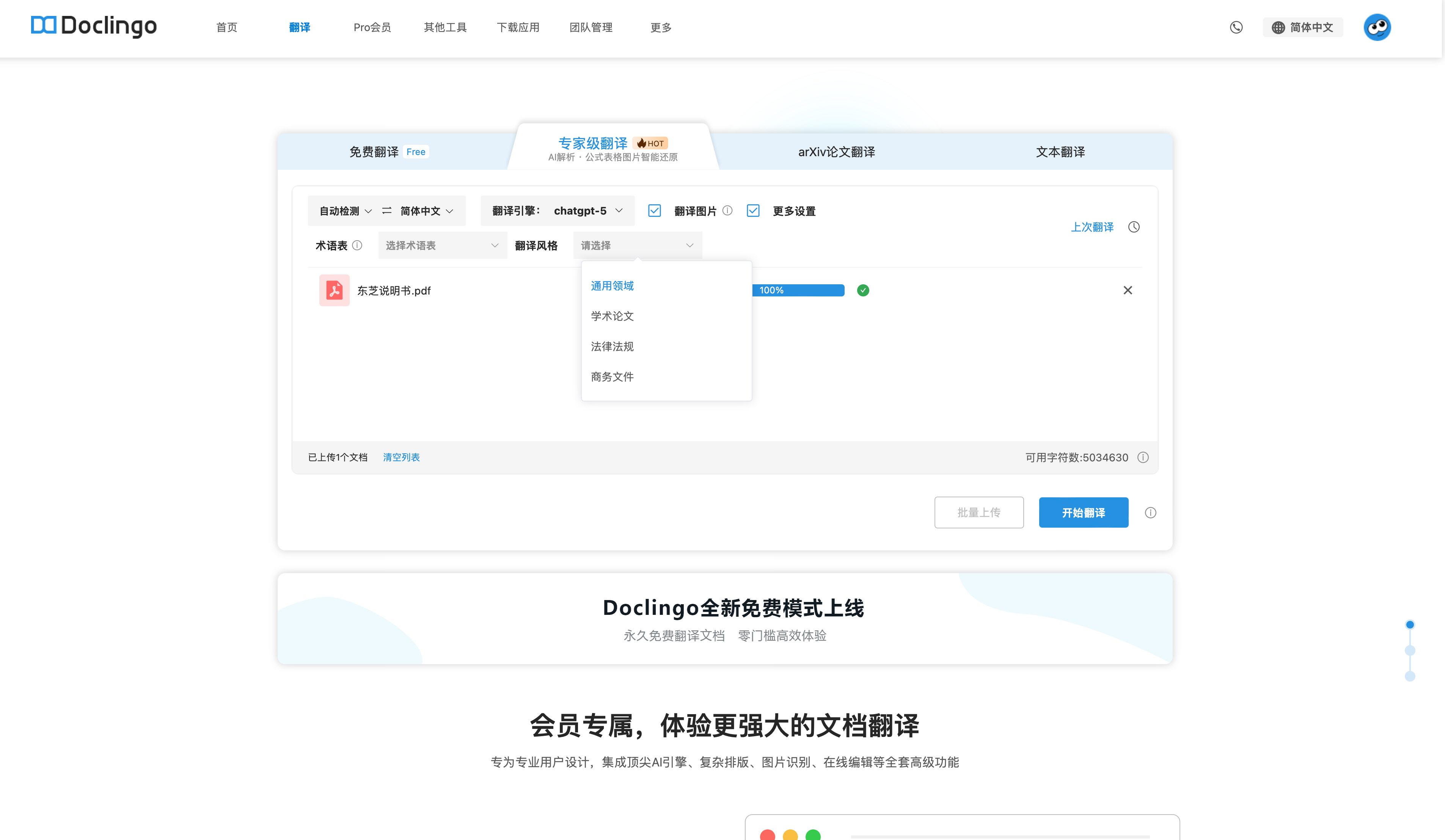
Dokumente in verschiedenen Szenarien haben unterschiedliche sprachliche Anforderungen. Daher hat Doclingo vier Übersetzungsstile hinzugefügt:
- Allgemeines Gebiet: Natürlich und flüssig, geeignet für alltägliche Dokumente
- Wissenschaftliche Arbeiten: Streng und professionell, entspricht akademischem Ausdruck
- Gesetze und Vorschriften: Formulierung formal, logische Klarheit
- Geschäftsdokumente: Professionell und formal, klare Ausdrucksweise
Benutzer können vor der Übersetzung den Stil frei wählen, und das System wird automatisch den entsprechenden Sprachstil anpassen, um die Übersetzung besser an das Szenario anzupassen.
3. Wie benutzt man es?
Diese Funktion ist nur in der 【Expertenübersetzung】 verfügbar.
- Dokument hochladen und die Übersetzungsoption 【Mehr】 auswählen, um die Funktion 【Übersetzungsstil】 zu aktivieren.
- Auf der Vorschauseite nach Abschluss der Übersetzung unten im Navigationsbereich auf AI-Korrektur klicken, um zu den Korrekturoptionen zu gelangen.
- Nach dem Klicken auf „Korrektur starten“ bitte geduldig auf die Generierung der Ergebnisse warten, nach Abschluss erfolgt eine E-Mail-Benachrichtigung.
Empfohlene Kombination:
Zuerst den Übersetzungsstil auswählen → dann die AI-Korrektur aktivieren, um die besten Ergebnisse zu erzielen.
4. Zusammenfassung
Durch die Kombination von AI-Korrektur und Übersetzungsstil ermöglicht Doclingo eine Dokumentenübersetzung, die nicht nur eine höhere Genauigkeit aufweist, sondern auch die Anforderungen verschiedener Szenarien wirklich erfüllt.
Dieses Versionsupdate wird Ihnen helfen, Zeit zu sparen und die Professionalität der Übersetzung zu steigern, sodass die Kommunikation über Sprachgrenzen hinweg reibungsloser verläuft.
Erleben Sie jetzt Doclingo V1.0.38 und starten Sie Ihre effiziente und intelligente Übersetzungsreise!